宝塔部署react项目(vue也适用)1. 服务器编译好项目文件记住编译后的目录,比如www/project/build/
2. 宝塔创建项目网站 –》 创建站点 –》根目录(你编译好的文件位置)www/project/build/.点击提交就创建好了。
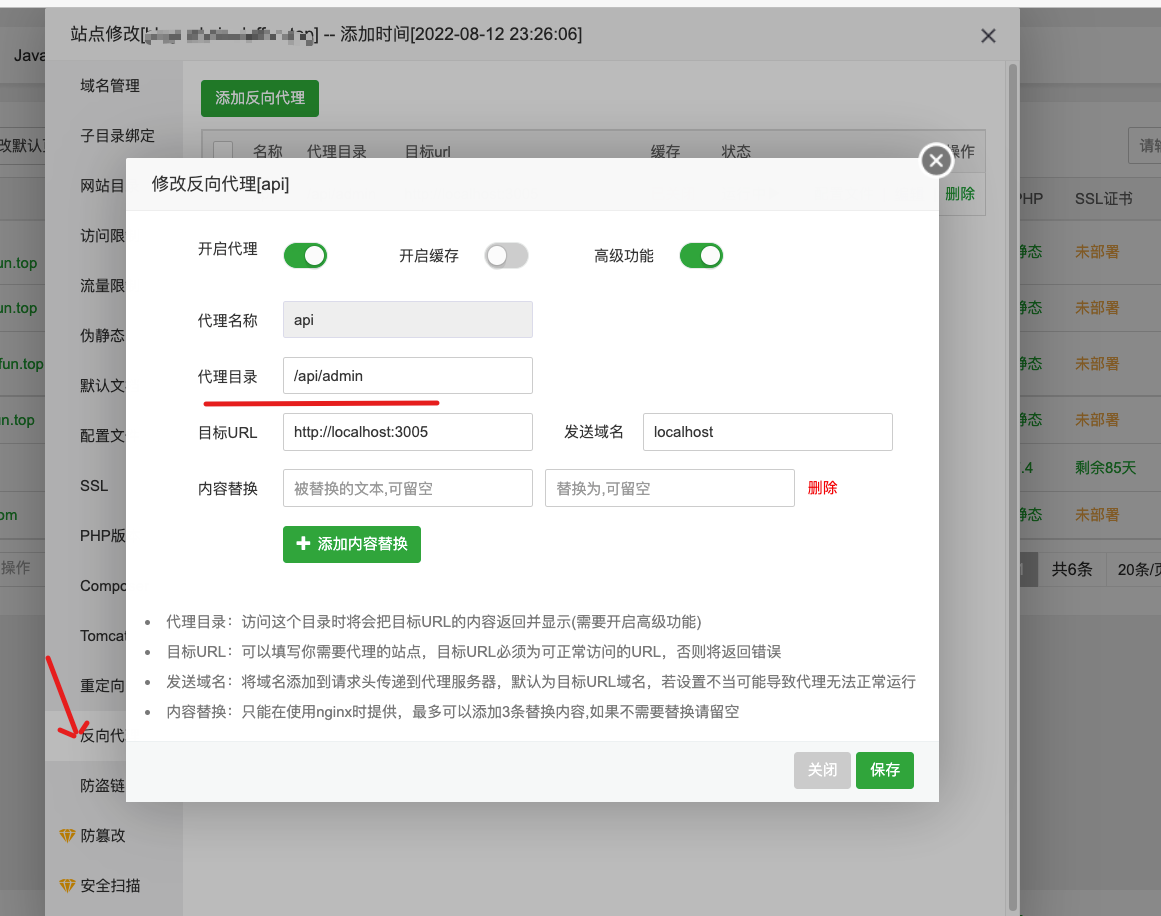
3. 配置后端代理打开宝塔里面的这个项目, 点击反向代理。
添加代理。那个代理目录就是你代码里面写的。比如我用的axios。 baseUrl是/api/admin。 所以就填的/api/admin
配置history模式打开ngnix文件。我是直接在第三步的文件里面操作的。这个文件按理只写proxy。 但是为了方便就没注意了。
宝塔 ngnix 存放目录 https://www.vpsss.net/24691.html
搭建code server简单的介绍一下code server吧
Run VS Code on any machine anywhere and access it in the browser.
在你的服务器或者机器上安装code server,可以在浏览器上使用vscode。简单点来说就是一个web版的vscode。
这是项目地址 github地址
在github中介绍了三种安装方式 - 使用安装脚本进行安装
手动安装
使用一键部署
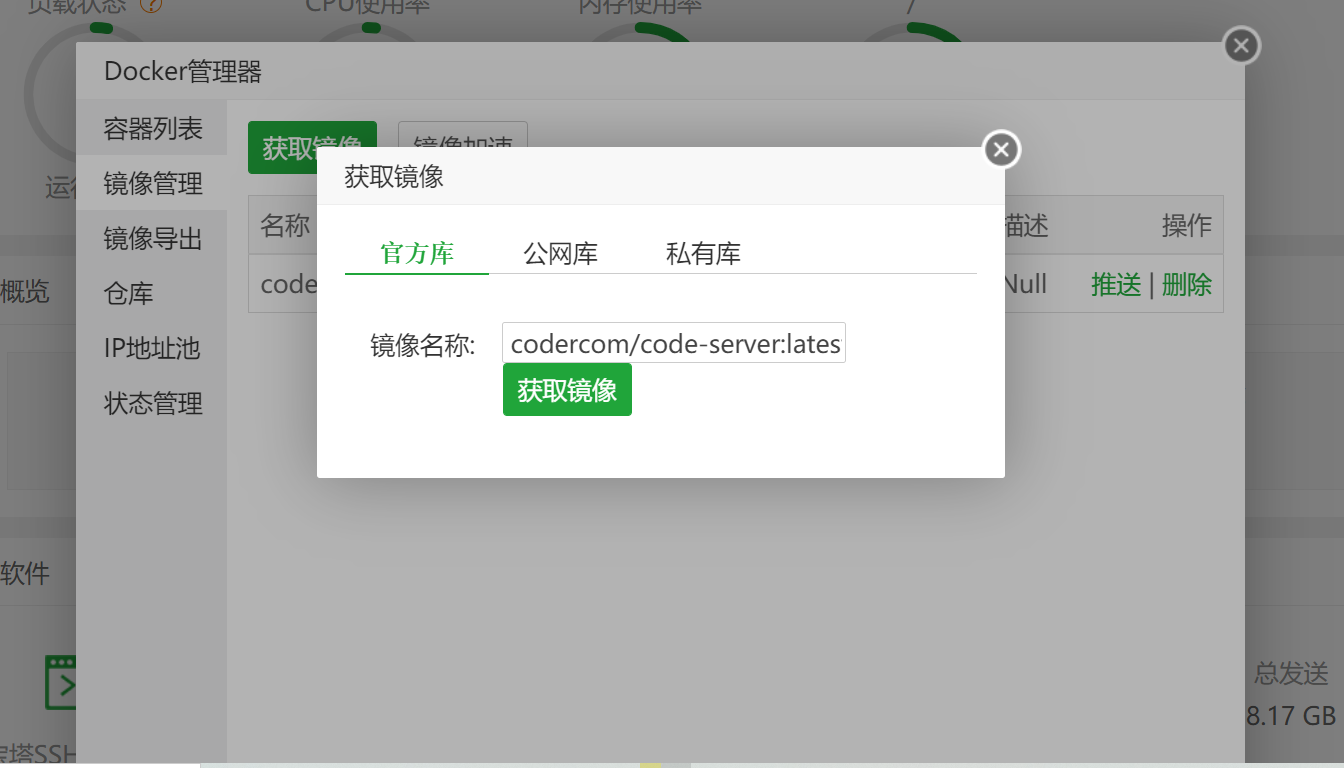
宝塔 + docker这种方式比较简单,安装前提是你已经安装宝塔并在宝塔面板里面安装了docker管理器,首先是在docker管理器里面添加镜像codercom/code-server:latest。点击获取,(TIP:文件较大)
下载完成后,点击docker管理器的容器列表里面的添加容器,选择下载好的镜像,选择下载好的codeserver镜像,选择自己喜欢的端口(官方是8080端口)一定要选择环境变量,也可以在容器中重新配置环境
使用安装包的方式比较麻烦, 不推荐先在服务器里面下载github上面的relase文件,然后解压到随意一个目录 ...

ElForm 里的 ElTree 校验流程123<el-form-item prop="permissionIds"> <el-tree ref="treeRef" show-checkbox node-key="id" :default-expand-all="true" :default-checked-keys="detail.permissionIds" :data="permissionList" :props="treeProps" @check="onPermissionCheck" ></el-tree></el-form-item>
img图片1
点击 tree 组件。触发了这些事件。 从 ElCheckBox 开始看起
Che ...
JS Date操作1const weekDay = new Date(date.setDate(1)).getDay() // 这个月的第一天是星期几const monthLen = new Date(date.getFullYear(), date.getMonth() + 1, 0).getDate() // 本月一共多少天
获取一周的日期123getDate(offset: number) { const current = new Date(); const weekDay = current.getDay(); const dayMilliseconds = 24 * 60 * 60 * 1000; // 一天多少毫秒 const flagTimestamp = current.setHours(0, 0, 0, 0) + offset * 7 * dayMilliseconds; const dateAry = [...new Array(7).keys()] .map((i: number) => new Date(flagTimestamp ...

Nest JS 权限控制 rabc 0 的一种实现文章更多的是在于记录。有看不懂的评论
2.1 RBAC 0 https://juejin.cn/post/6844904109863075853#heading-3
最简单的用户、角色、权限模型。这里面又包含了2种:
用户和角色是多对一关系,即:一个用户只充当一种角色,一种角色可以有多个用户担当。
用户和角色是多对多关系,即:一个用户可同时充当多种角色,一种角色可以有多个用户担当。
jwt依赖包
@nestjs/jwt passport-jwt
构建 jwt 策略
这是用来对 token 进行处理的。他会在 request
jwt.strategy.ts
12345678import { Injectable } from '@nestjs/common';import { ConfigService } from '@nestjs/config';import { PassportStrategy } from '@n ...
Vue defineReactive核心原理
123456789101112function defineReactive(target, key, value) { Object.defineProperty(target, key, { get() { console.log('getter key = ', key) return value }, set(newV) { console.log(`setter ${key} = ${value}`) if (newV === value) return value = newV return value } })}
对于数组和对象有不同的处理方式, 外面套一层
1234567891011function Observer(value) { if (Array.isArray(value)) ...
Vue-Challenges2. ref 全家桶https://github.com/webfansplz/vuejs-challenges/blob/main/questions/2-ref-family/README.zh-CN.md
12345678910111213141516171819202122232425262728293031323334353637383940414243444546474849505152535455565758596061<script setup lang="ts">import { ref, Ref, reactive, isRef, unref, toRef } from "vue"const initial = ref(10)const count = ref(0)// Challenge 1: Update reffunction update(value) { count.value = value}/** * Challenge 2: Ch ...
Web: 一个跨页面动画的 API我目前知道的跨页面动画需要用到 JS。通过 FLIP思想来做。
现在看到了一个新的 API。copy 过来给大家看看https://developer.chrome.com/docs/web-platform/view-transitions/#api-reference
Smooth and simple transitions with the View Transitions API
Published on Tuesday, August 17, 2021 • Updated on Tuesday, November22, 2022
Jake Archibald Jake Archibald Human boy working on web standards atGoogle
Website Twitter This feature was previously called “Shared ElementTransitions”, and is sometimes referred to as “page transitions”.
The ...
class-transform 执行两次 debug没有什么技术含量, 只是记录一下过程。
具体问题在这里
[nestjs
class-transfrom @Transform execute twice and return null -Stack Overflow](https://stackoverflow.com/questions/75673361/class-transfrom-transform-execute-twice-and-return-null)
1. vscode debug
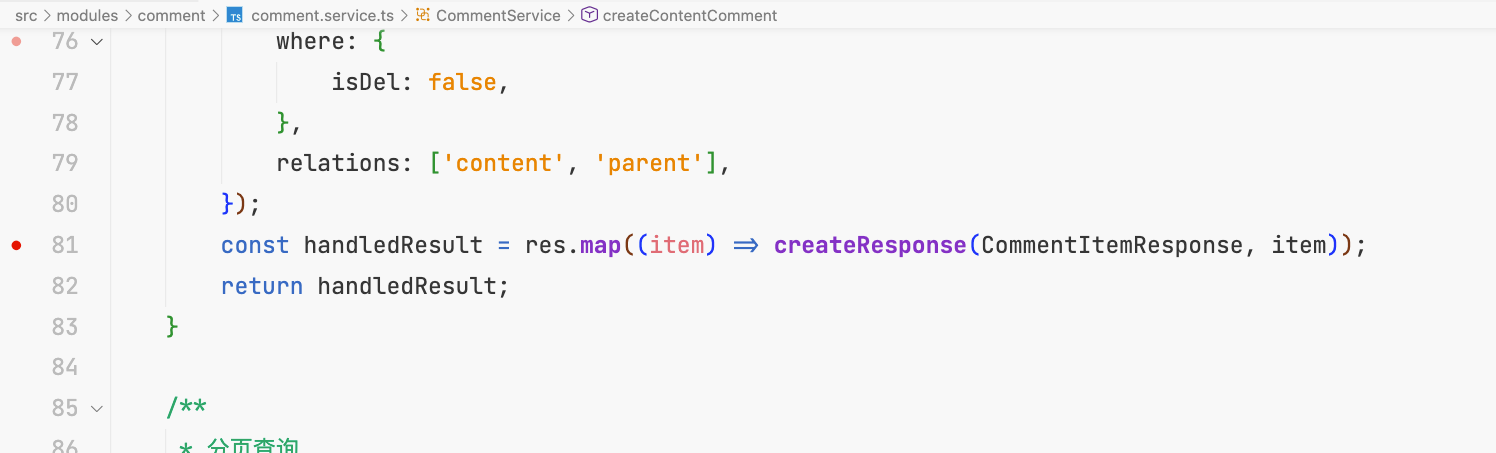
在这里打一个断点, vscode attach端口。请求对应接口。 vscode会自动中断于断点处
调试
查看调用堆栈。 发现被调用了两次 class-transfrom。 第二次调用的时候是nest 调用的, 但是nest 并没有依赖class-transfrom。所以就想到了是不是做了一层全局的序列化。 到main.ts里面找到了相关代码。 去掉全局序列化就行了。
1app.useGlobalInterceptors(new ClassSerializerInterceptor ...
element scrollBar 使用项目架构
1{ "dependencies": { "element-ui": "^2.4.5", "vue": "^2.6.11", }, "devDependencies": { "@vue/cli-plugin-typescript": "^4.5.0", "typescript": "~3.9.3", }}
定义 ScrollBar组件的 .d.ts123456import type { ElementUIComponent } from 'element-ui/types/component';declare class ElScrollbar extends ElementUIComponent & ...


