element el-pagination current-page 赋值无效分析
aelaxelement
el-pagination current-page 赋值无效分析
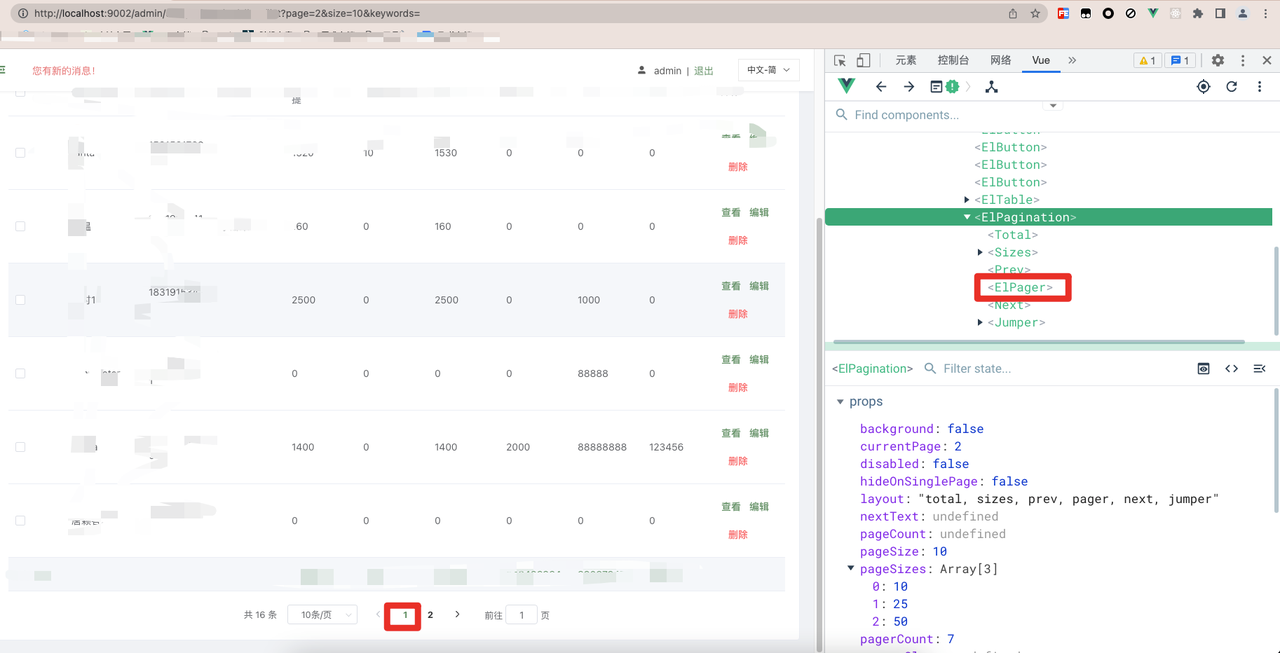
先看组件 高亮的页面是 1 ,但是应该是高亮的 2.
ElPager

1
2
3
4
5
| <li
:class="{ active: currentPage === pageCount, disabled }"
class="number"
v-if="pageCount > 1"
>{{ pageCount }}</li>
|
发现由 currentPage(props) 控制高亮。由于是 props 。 往上找组件
ElPagination
1
2
3
4
5
6
7
| <pager
currentPage={ this.internalCurrentPage }
pageCount={ this.internalPageCount }
pagerCount={ this.pagerCount }
on-change={ this.handleCurrentChange }
disabled={ this.disabled }
></pager>
|
发现 ElPager 的currentPage 依赖 ElPagination 的
internalCurrentPage。
继续查找internalCurrentPage 在 watch
里面对internalCurrentPage
进行了赋值。这里也有一个currentPage(props)
1
2
3
4
5
| watch: {
currentPage: {
immediate: true, handler(val) {
this.internalCurrentPage = this.getValidCurrentPage(val); }
},}
|
继续看一下如何计算internalCurrentPage的
1
2
3
4
5
6
7
8
9
10
11
| getValidCurrentPage(value) {
value = parseInt(value, 10); const havePageCount = typeof this.internalPageCount === 'number'; let resetValue; if (!havePageCount) {
if (isNaN(value) || value < 1) resetValue = 1; } else {
if (value < 1) {
resetValue = 1; } else if (value > this.internalPageCount) {
resetValue = this.internalPageCount; }
}
if (resetValue === undefined && isNaN(value)) {
resetValue = 1; } else if (resetValue === 0) {
resetValue = 1; }
return resetValue === undefined ? value : resetValue; },
|
计算的时候依赖了internalPageCount。在某些情况下会将当前页设置为1。
答案就出来了。 因为ElPagination 的数据是通过接口请求的。 在接口请求前将
分页组件的 currentPage 设置了2。 但是数据总数这个时候是0。所以 element
就将internalPageCount
设置为1了。接口请求完成后虽然有了总数。 但是由于 ElPagination 的
currentPage(props)没有变,所以就不会触发
internalPageCount的更新。