Codex 执行完成后发送通知(支持云环境 / VSCode / 飞书)

Codex 执行完成后发送通知(支持云环境 / VSCode / 飞书)
aelax前言
在 macOS 上直接使用终端运行 Codex 时,它默认会发送系统通知。但这个通知机制有一个明显限制:它依赖终端环境本身。
一旦你在下面这些场景中使用 Codex,通知就会“消失”:
- VSCode 内置终端
- 远程服务器 / 云开发环境(如 cnb)
- 非 macOS 系统
但 Codex 的任务往往是异步且耗时的,比如跑一轮代码修改、重构或者分析。如果没有通知,很容易切走干别的事情,回来才发现早就跑完了。
我的需求很简单:
无论 Codex 在哪里跑,只要执行完成,就给我发一条即时通讯通知。
好在 Codex 官方已经预留了一个非常干净的扩展点:notify。
Codex 的 notify 机制是什么?
在 OpenAI 官方文档中,有一段对 notify 的说明(原文见官方文档):
Codex 在特定事件发生时(目前主要是 agent-turn-complete),可以调用一个外部程序,并把事件信息以 JSON 参数的形式传给它。
换句话说:
Codex 不负责“怎么通知”,它只负责“在什么时候把事件广播出去”。
你可以用这个事件去做任何事:
- 弹系统通知
- 调用 Webhook
- 发消息到飞书 / Telegram / Slack
- CI / 自动化流水线联动
官方示例里是用 Python 调 terminal-notifier 发 macOS 通知,本质非常简单:
1 | notify = ["python3", "/path/to/notify.py"] |
Codex 每次触发事件时,都会把一个 JSON 字符串作为参数传给脚本,里面包含:
type:事件类型(目前主要是agent-turn-complete)thread-id:会话 IDturn-id:本次 turn 的 IDcwd:当前工作目录last-assistant-message:Codex 最后一条输出内容
明白这一点之后,实现方式就完全自由了。
实现:通过飞书 Webhook 接收 Codex 完成通知
下面是我自己的实现方式:
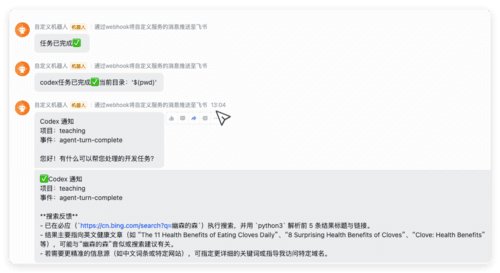
当 Codex 执行完成时,通过 飞书机器人 Webhook 发送一条消息。
⚠️ 说明
- 使用 Python 实现(macOS 自带环境即可)
- 如果 Codex 本身运行在 iTerm 中,会跳过通知,避免重复提醒
通知脚本
1 | #!/usr/bin/env python3 |
注意:
- 这是 Python 脚本,注释必须使用
#- 如果不使用
#!/usr/bin/env python3,也可以在配置中显式写python3 script.py
Codex 配置
macOS 下 Codex 的配置文件路径为:
1 | ~/.codex/config.toml |
加入一行:
1 | notify = ["python3", "/绝对路径/notify.py"] |
保存后 重启 Codex,即可生效。
之后无论你是在 VSCode、云环境还是远程服务器中使用 Codex,只要一次 turn 执行完成,飞书就会收到通知。
其他通知方案参考
如果你不使用飞书,下面这些方案也值得一看:
Windows 用户
Windows 版 Codex 配置完成后发送通知Claude Code 用户
Claude Code 运行完成后弹出提示远程 / 自动化玩法
通过 Telegram 远程控制 AI TUI